Digital Transformation
 Data Engineering
 Implementation
 Staffing Services


When a customer support chatbot takes several seconds to answer a simple question, users may lose patience. Similarly, it becomes equally challenging when an AI application must handle a growing number of requests without increasing computing costs. In many cases, the problem lies in how efficiently the system processes each request. AI inference (the process of generating predictions or responses from a trained model) can slow down because of limited GPU capacity, memory constraints, unnecessary computations, and excessive data transfers. AI model optimization addresses these bottlenecks and improves inference efficiency.

The April 2026 MLPerf Inference v6.0 results showed how software updates can improve inference performance. NVIDIA reported up to 2.7x higher token throughput on its GB300 NVL72 system running DeepSeek-R1 compared with its initial submissions six months earlier.
This blog explores 7 AI optimization techniques on how to optimize AI models to identify and address performance bottlenecks. These techniques for optimizing AI models will allow organizations to learn about ways to detect where the AI workload is suffering from the loss of performance and to optimize computation, memory, batching, GPU usage, and inference execution.
Key Takeaways
- AI model optimization improves inference speed, throughput, and resource efficiency.
- 7 AI optimization techniques address computation, memory, GPU utilization, data movement, execution efficiency, and execution overhead.
- Profiling helps identify the right technique for each AI workload.
- Measure latency, throughput, memory use, and inference costs before and after optimization.
- The best optimization strategy balances performance, resource use, and application requirements.
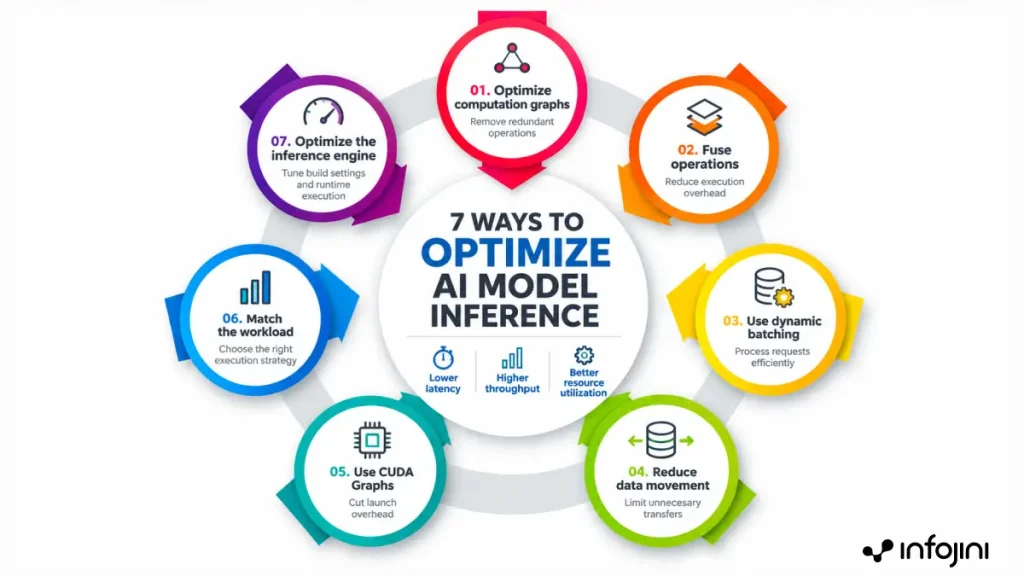
7 AI model Optimization Techniques to Improve Inference Performance
Slow inference can stem from inefficient computation, excessive data movement, or underutilized hardware. The following 7 techniques address these bottlenecks to improve inference speed and resource efficiency.
1. Optimize the Computation Graph Before Changing the Model
This is one approach to AI model optimization. It improves computational efficiency without changing what the trained model has already learned. The computation graph of a trained model may have redundant computations and transformations, leading to slower inference. Graph optimization is a technique that makes the representation and execution of the computations more efficient without modifying what the model has learned.
What to optimize:
- Remove redundant computations: Get rid of the nodes that are not required to compute an output.
- Precompute constants: Calculate fixed values before inference so that the model does not have to calculate them repeatedly during execution.
- Simplify the graph: Remove any unnecessary reshaping operations and fuse compatible operations.
- Identify incompatible operations: Look for the operations that might not be supported by the inference of runtime.
ONNX Runtime provides some optimizations like constant folding, elimination of nodes, and fusion of operators.
What to look for: Redundant computations, unnecessary transformations, and operations that are not supported by the inference of runtime. The objective is to avoid unnecessary computation before making changes to the model.
2. Fuse Operations to Reduce Memory Traffic and Kernel Launches
Individual execution of each operation may cause redundant GPU kernel launches and memory accesses. By fusing two or more operators that are compatible to work together, the operator’s fusion technique optimizes the process, making it efficient and minimizing overhead. For instance, an inference engine might fuse a convolution operation along with an activation function without storing the results in memory.
What to optimize:
- Fuse compatible operations: Seek patterns like convolution and activation or addition.
- Eliminate intermediate memory writes: Don’t write intermediate tensors if you are doing fusion.
- Leverage runtime-based fusions: Use runtime tools such as TensorRT and ONNX Runtime, which provide different types of fusions.
What to look for: Models that have lots of small operations, kernel launches, or memory movements between consecutive operations. Fusion helps in improving the inference performance, especially if there is high overhead associated with the execution.
3. Use Dynamic Batching to Keep the Accelerator Busy
A GPU may be underutilized if the inference service processes one request at a time instead of batching multiple requests together. Batching allows the GPU to process more inputs in a single execution, improving its utilization and potentially increasing throughput. But if you wait too long to group the requests, it increases latency.
What to optimize:
- Batch size: Try out various batch sizes to create a suitable balance between throughput and latency.
- Delay in batching: Restrict how much the request must wait until it is processed.
- Workload constraints: Make use of small batches for applications that need user interaction and big batches for applications that prioritize throughput.
What to look for: Poor GPU utilization, many small requests, and a difference between latency per request and throughput. The objective is to maximize the usage of the accelerator without keeping the user waiting unnecessarily.
4. Reduce Unnecessary Movement of Data
Inference performance is impacted not only by computation, but also by data transfer efficiency. Data transfer between CPU and GPU memory, redundant tensor copies, and excessive synchronization can create overhead even if there is enough compute capacity.
What to optimize:
- Transfers from CPU to GPU: Decrease unnecessary data transfer between the system memory and an accelerator’s memory.
- Intermediate tensors: Try to avoid copying and transferring data where it can stay in place for the next operation to be performed.
- Memory layouts: Minimize unnecessary layout conversions between operations.
- Transfer methods: Think about asynchronous data transfer when possible.
What to look for: Excessive memory transfers, tensor copies, synchronization overhead, and memory access overhead taking a considerable amount of inference time. The task is to make the data access chain shorter and decrease overhead.
5. Use CUDA Graphs When Launch Overhead Becomes the Bottleneck
For scenarios with many GPU operations performed in parallel, the cost associated with kernel launches and synchronizations can make up a significant part of the total inference time. CUDA Graphs allow one to optimize this cost by recording a sequence of GPU operations and executing them afterwards.
CUDA Graphs prove especially beneficial when this execution pattern repeats itself several times, for instance, in the case of inference requests with identical input shapes.
What to optimize:
- Repeated execution patterns: Capture sequences of operations that are performed frequently.
- Kernel-launch overhead: Reduce the cost of repeatedly launching individual operations.
- Execution stability: Check whether input shapes and execution patterns are consistent enough for graph replay.
What to look for: The profiling data that indicates high cost of launches compared to the amount of computation done.
6. Match Execution Strategies to the Workload
Inference requests can differ in input size, output length, latency requirement, or amount of memory. If each request is treated equally, the resulting system of resource usage may be inefficient. Workload-aware scheduling is essential for effective AI workload optimization.
What to optimize:
- Request size: Separate short inputs from requests requiring substantial processing.
- Latency requirement: Give priority to interactive requests if latency is important.
- Workload batching and scheduling: Batching and scheduling compatible requests and assigning resources based on workload characteristics.
- Memory/compute requirement: Assigning workloads to an appropriate execution configuration if possible.
What to look for: Performance differences between request types, imbalanced resource usage, and workloads that have production traffic characteristics that differ from the benchmarks. The idea is to optimize based on actual workload characteristics instead of benchmark performance.
The growing use of multi-node systems also highlights the range of infrastructure configurations used for AI inference. MLCommons reported a 30% increase in multi-node system submissions in its April 2026 MLPerf Inference v6.0 results. Systems with more than ten nodes accounted for 10% of submissions, up from 2% in the previous round.
7. Optimize the Inference Engine Build, Not Just Runtime Execution
Engine inference can compare the performance of various implementations to identify the most suitable ones for the target device. Optimization of the inference engine can enhance the run time performance and avoid duplication of efforts throughout the development process.
What to optimize:
- Build-time settings: Balance engine-building time against the depth of optimization.
- Tactic selection: Allow the engine to evaluate suitable implementations for the target hardware.
- Timing caches: Reuse old profiling data whenever appropriate to avoid redundant work.
- Deploying configurations: Build and test the engines for the hardware and workload they’ll be running on.
What to watch out for: Duplicate building of engines, lengthy optimization phases, repeated profiling, and discrepancies between the development and production hardware. Iterating teams might focus on speeding up their builds, whereas production environments might benefit more from optimization.
How to Choose the Right AI Model Optimization Technique
Efficient AI performance and AI experience optimization can begin from the moment we detect at which stage of the inference process there is either a loss of time or loss of computing power. The choice of the particular AI model optimization strategy can be initiated by understanding the reason for the performance degradation. Utilizing a multitude of strategies at once may make it difficult to determine what worked and what brought additional cost overhead. It might be more efficient to profile your problem first and then optimize accordingly.
- Low GPU utilization: Consider batching, concurrency, and request delivery.
- Kernel launches and small workloads: Graph optimization, operator fusion, and CUDA Graphs.
- High memory bandwidth usage: Investigate tensor transfers, intermediate buffers, and memory formats.
- Different request latencies: Strategic workload scheduling and different execution strategies.
- Long engine builds: Check the build parameters and timing caches.
Before implementing any optimizations, create a baseline using an exemplary workload and measuring metrics like time to first token, latency, throughput, GPU memory usage, or cost per inference. After implementing the optimization, run the workload again to see if the optimization worked.
The key is to optimize the outcome and not just the benchmark. A technique that increases throughput may also increase latency, while reducing memory usage may not make inference faster. The most effective combination of AI optimization techniques is the one that addresses the actual bottleneck and improves performance against the application’s requirements.

AI Model Optimization is About Removing Wasted Work
AI model optimization is often presented as a model-compression exercise. But production performance matters much more than model size. A model can lose performance because its computational graph contains unnecessary operations. It can waste GPU capacity because requests are processed individually. It can take too much time to move intermediate data. It can incur excessive kernel-launch overhead. Or it can use an inefficient execution strategy for the workload it receives.
That is why optimization should look beyond model weights. Each graph of simplification, operator fusion, dynamic batching, efficient memory management, CUDA Graphs, workload-aware scheduling, and optimized engine buildings addresses a certain type of overhead. The documentation of NVIDIA and ONNX Runtime reveals that some of these optimization methods are already embedded into the latest inference stacks, rather than forcing teams to come up with new AI models.
Conclusion
In the end, how can AI models be optimized is not about addressing the longest list of techniques covered. It is about finding the areas in which the system spends unnecessary time and optimizing them. When these optimizations result in reduced latency, more efficient utilization of infrastructure, and better performance of applications, they can become an important part of a successful AI optimization strategy as well.
Frequently Asked Questions
Why is optimizing AI models important for inference?
Inference operations are done repeatedly in a production environment, so any inefficiency will eventually matter. Optimization of inference can help speed up responses, increase capacity, make better use of the available hardware, and decrease the amount of computation resources needed to handle a workload.
What AI model optimization technique should businesses apply initially?
A good starting point could be profiling to understand what the current bottleneck is. It may turn out to be batching, graph optimization, data transfer, or kernel launch overhead. Setting a good baseline before doing anything has been suggested in NVIDIA’s performance advice.
Is it possible to optimize AI models without retraining them?
Yes, it is possible. There are several ways to optimize AI models at the level of inference which do not imply the modification of model weights and re-training of models.
Is it possible to lower infrastructure costs using AI model optimizations?
Yes, it is. Higher efficiency might help handle more requests with the existing hardware configuration, handle a specific workload with fewer resources, or postpone purchasing new accelerators altogether.