 Digital Transformation
 Data Engineering
 Implementation
 Staffing Services


Choosing the right cross-platform application development framework makes a massive difference in how your development team builds and maintains an app. Frameworks influence the amount of code that can be reused, the ability to access native capabilities, and the platform-specific development required. Each framework takes a different approach to UI, business logic, native integration, and platform support. The right choice solely relies on what you are building and how your team works.
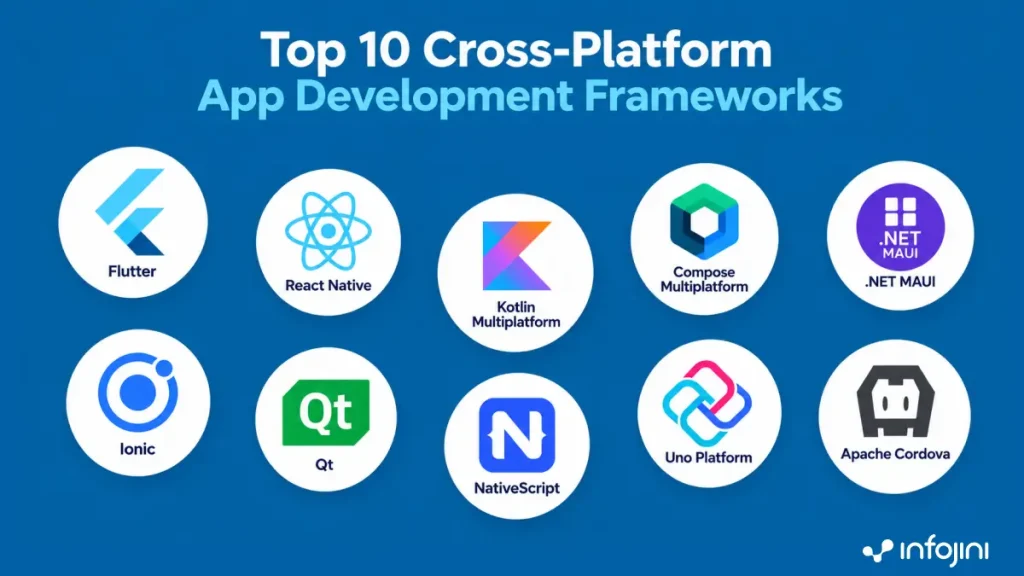
This guide discusses the 10 cross-platform application development frameworks you want to consider in 2027. These include Flutter, React Native, Kotlin Multiplatform, .NET MAUI, and several others. You will see how each framework works, where it fits, its key strengths and limitations, and the types of applications it is best suited for.
Key Takeaways
- This article covers 10 frameworks for building apps that work on multiple platforms and how they differ in code sharing, UI, and business logic.
- These top frameworks are diverse in terms of their approach to native capabilities, supported platforms, and development.
- Each framework is characterized by their own pros, cons, and areas of application.
- The right choice depends on the application requirements, target platforms, and the development team’s expertise.
10 Cross-Platform App Development Frameworks Worth Considering in 2027
1. Flutter
Flutter utilizes Dart programming language, together with a unique user interface tool kit, for developing applications on various platforms. With more control of the appearance and behavior of the interface, it is helpful when designing products that require similar interface design on various platforms.
Flutter 3.47 was released in August 2026, with continued updates across mobile, web, desktop, and tooling.
Key features
- Dart-based development
- Shared UI and application code
- Large collection of widgets
- Android, iOS, web, and desktop support
- Native platform integration
Pros
- Consistent UI across platforms
- Strong development and testing workflow
- Good fit for highly customized interfaces
- One technology stack can cover several platforms
Cons
- Teams need Dart and Flutter expertise
- Some platform-specific features still require native work
- Flutter’s UI approach may not suit every product
Good fit for: Consumer apps, commerce, financial apps, and products with highly customized interfaces.
2. React Native
React Native brings React development into mobile applications. Teams can use JavaScript or TypeScript and share substantial application code while still working with native platform capabilities.
React Native 0.87, released in August 2026, made its Strict TypeScript API the default and introduced changes including experimental Swift Package Manager support and Android Gradle Plugin 9 support.
Key features
- JavaScript and TypeScript
- React-based development
- Native platform integration
- Large developer ecosystem
- Shared application code
Pros
- Useful for teams already using React
- Strong ecosystem and developer availability
- Native capabilities remain accessible
- Can reduce duplication across mobile teams
Cons
- Native knowledge is still needed for more specialized features
- Third-party dependency maintenance needs attention
- Platform updates can affect libraries and integrations
Good fit for: Consumer apps, ecommerce, collaboration products, and organizations with established React teams.
3. Kotlin Multiplatform
Kotlin Multiplatform framework adopts another strategy for cross-platform app development. This allows the use of business logic, network, data model and other layers in the application, with the UI being native if necessary.
JetBrains introduced a new default project structure in 2026 that makes the separation between shared code and platform-specific applications clearer.
Key features
- Kotlin-based development
- Flexible code sharing
- Native UI option
- Android and iOS interoperability
- Support for shared business logic
Pros
- Teams can decide what to share
- Strong fit with native Android development
- Native interfaces can be retained
- Useful for gradually introducing shared code
Cons
- Requires Kotlin expertise
- Teams still need iOS development capability
- Architecture can become more involved when shared and native layers are mixed
Good fit for: Organizations with Kotlin or Android expertise that want code reuse without giving up native development.
4. Compose Multiplatform
Compose Multiplatform extends Kotlin’s declarative UI approach beyond Android. It is like Kotlin MultiPlatform (KMP); however, the two technologies differ. The former targets code reuse, whereas the latter allows not only code but also UI reuse.
Compose Multiplatform 1.12 was released in August 2026 with new development tooling, including capabilities around AI-assisted workflows.
Key features
- Kotlin-based UI development
- Declarative UI model
- Shared UI option
- Works with Kotlin Multiplatform
- Support across mobile and other platforms
Pros
- Familiar model for Jetpack Compose developers
- Allows UI sharing where appropriate
- Can work alongside native code
- Fits Kotlin-focused teams
Cons
- Kotlin expertise is required
- Teams need to understand both shared and native layers
- Not every project needs shared UI
Good fit for: Kotlin teams that want to extend code sharing beyond business logic.
5. .NET MAUI
The .NET MAUI offers the possibility to incorporate mobile and desktop app development in the .NET world using C# and XAML. It is particularly fascinating for organizations that have made investments in Microsoft applications.
Version 10 of .NET MAUI is the current stable release, available since September 2026. The previous version, .NET MAUI 9, became unsupported in May 2026.
Key features
- C# and .NET
- Shared project structure
- Android, iOS, macOS, and Windows support
- Visual Studio integration
- Platform-specific code when required
Pros
- Familiar for .NET teams
- Works well with the broader Microsoft stack
- Supports both mobile and desktop development
- Allows shared business logic and UI
Cons
- Less attractive if the organization is not already invested in .NET
- Platform-specific requirements still need testing
- Teams need to track the .NET and MAUI release cycle
Good fit for: Enterprises that are Microsoft-centric and teams already using C#, Azure, Visual Studio, and Windows technologies.
6. Ionic
Ionic begins by considering web technologies rather than a specific programming language for mobile devices. A developer can code in any language ranging from HTML, CSS, JavaScript, Angular, React, or Vue and Capacitor will be used when there is a need for native features.
Ionic Framework version 9 was released in August 2026 and had new features including router support for latest React and Vue routers, Angular Compatibility, and Migration tool from Ionic 8.
Key features
- HTML, CSS, and JavaScript
- Angular, React, and Vue support
- Web-first development
- Native capabilities through Capacitor
- Reusable web development skills
Pros
- Familiar to web development teams
- Strong option for business and internal applications
- One web-oriented codebase can serve multiple targets
- Easier transition for organizations with existing web expertise
Cons
- Demanding graphics and hardware use cases need careful testing
- Web-based runtime characteristics can affect some applications
- Native functionality may require additional integrations
Good fit for: Business applications, workforce apps, portals, and products with strong web development requirements.
7. Qt
Qt is built around C++ and it is used for more than just mobile applications. It can be used to build desktop software, embedded systems, industrial applications, and applications that need graphics or hardware-level capabilities.
Qt 6.11 came out in 2026 with some graphical and performance-related updates and 6.11.2 included some 400 fixes and enhancements.
Key features
- C++ development
- Desktop and mobile support
- Embedded and hardware integration
- Rich UI capabilities
- Graphics and performance tooling
Pros
- Strong for hardware-oriented applications
- Broad platform coverage
- Mature technology
- Useful beyond conventional mobile apps
Cons
- C++ adds a different skills requirement
- May be unnecessary for straightforward business apps
- Licensing and technology choices need careful evaluation
Good fit for: Automotive, industrial, embedded, medical-device, and consumer-electronics applications.
8. NativeScript
NativeScript allows JavaScript and TypeScript developers to build mobile applications while working directly with native platform APIs and UI components.
It is different from simply packaging a web application for mobile. The development model itself is built around access to native platform capabilities.
Key features
- JavaScript and TypeScript
- Native UI components
- Direct platform API access
- Cross-platform development
- Web-development-friendly language
Pros
- Familiar languages for JS/TS developers
- Direct access to native capabilities
- Can reduce duplication between mobile platforms
Cons
- Smaller ecosystem than React Native or Flutter
- Library availability needs to be checked for each project
- Long-term support and maintainability should be assessed carefully
Good fit for: Teams that want JavaScript or TypeScript while retaining closer access to native mobile capabilities.
9. Uno Platform
Uno Platform allows for C# and XAML development on Android, iOS, macOS, Windows, Linux, and WebAssembly platforms. It can be especially effective in situations where mobile is just one aspect of an overall app strategy.
Key features
- C# and XAML
- Shared UI and application code
- WebAssembly support
- Mobile and desktop targets
- .NET ecosystem integration
Pros
- Broad platform reach
- Useful for organizations already invested in .NET
- Can reuse skills across mobile, desktop, and web
- WebAssembly support adds another deployment option
Cons
- Broad platform coverage does not mean identical behavior everywhere
- Platform-specific testing is still necessary
- May add unnecessary complexity for mobile-only projects
Good fit for: .NET organizations building applications that need mobile, desktop, and web targets.
10. Apache Cordova
Apache Cordova is one of the older names in cross-platform development. It uses HTML, CSS, and JavaScript and packages web applications for mobile platforms, with native device capabilities exposed through plugins.
For an existing Cordova application, history matters. A stable application does not necessarily need to be replaced simply because newer frameworks are available.
Key features
- HTML, CSS, and JavaScript
- Web-based development
- Plugin-based native functionality
- Long-established ecosystem
- Existing application support
Pros
- Familiar web technologies
- Existing Cordova applications can continue to be maintained
- Reuses web development skills
Cons
- Less compelling for many new mobile projects
- Plugin and ecosystem health needs to be checked
- New applications should be compared with newer alternatives
Good fit for: Existing Cordova applications and selected web-oriented mobile projects where migration is not justified.
Why Framework Selection Matters
Understanding which framework is best for cross-platform app development is not just a decision for the first release. The choice stays with the project for a long time. It affects the code the development team must maintain, the way new features are added, and how much platform-specific work comes up later. A cross-platform framework can influence these decisions beyond the initial development phase.
Start with the features that can cause trouble
A framework can look perfectly fine when you build a few screens and connect to an API. The real picture usually emerges when you start using the features that make the app more demanding.
Consider functionalities like offline capabilities, Bluetooth connectivity, camera functionality, GPS location, background execution, or push notifications. These need to be evaluated before finalizing a framework because it is much simpler to uncover any limitation in a smaller proof of concept than in an application that is being developed.
The same applies to code sharing. Sharing more code sounds attractive, but it is not always the easiest route. A team may choose to keep a particular part of the application native if that makes the code simpler to work with.
Your existing development team matters too
A company with several React developers will approach React Native differently from a company whose mobile team already works with Kotlin. The same applies to organizations that have spent years building around C# and .NET.
That experience was useful. Developers already know the language, tools, testing practices, and some of the platform issues they are likely to encounter. Choosing a framework that fits those existing skills can make the transition much less complicated.
Conclusion
The 10 frameworks covered in this article take different approaches to cross-platform development. Some let teams share most of the application, while others leave more room for native code.
That difference is worth considering before you commit to a framework. Consider the platforms, the features, and the skills needed to develop the application, and test the components of the application that are most significant. A small proof of concept can also make the choice clearer by showing how well a framework handles the features your application needs.
Frequently Asked Questions
What are cross-platform app development frameworks?
These are tools that enable teams to develop applications for different platforms and use some or most of the application code. The degree of code sharing depends on the architecture of the framework.
Which are the best cross-platform frameworks for developing mobile applications in 2027?
Among the best cross-platform mobile app development frameworks available in 2027, the right option depends on the application and development team.The best choices for 2027 are Flutter and React Native if the team wants to share much of the code base, but the Kotlin Multiplatform and Compose Multiplatform solutions are more flexible about sharing. .NET MAUI can be the solution of choice for organizations already relying on C# and .NET platform, and Ionic will suit those that come from web development. Qt, NativeScript, Uno Platform, and Apache Cordova can be considered as well depending on the needs. The final decision should be based on the application functionality, intended platforms, native integration, and developer skills.
Is cross-platform development good for enterprise apps?
Yes, in certain cases. The approach can help save effort when developing duplicated functionality that is needed for several platforms. Nevertheless, enterprises should take into account many factors in addition to the code sharing, including security, native integrations, testing, support, and maintenance.
What is the difference between cross-platform and native development?
The native development uses platform-specific development tools like Android and iOS technologies. Cross-platform development provides an opportunity to use some application code for different platforms. In some frameworks, the application code is used almost entirely, and in others, some particular layers of the code.