Digital Transformation
 Data Engineering
 Implementation
 Staffing Services


Workforce automation should do more than just eliminate repetitive tasks. Automation should help businesses increase their production capability, speed up processes, save costs, and scale without the need to keep adding staff to the payroll. Through re-engineering workflows and the use of technology, businesses will be able to achieve this.
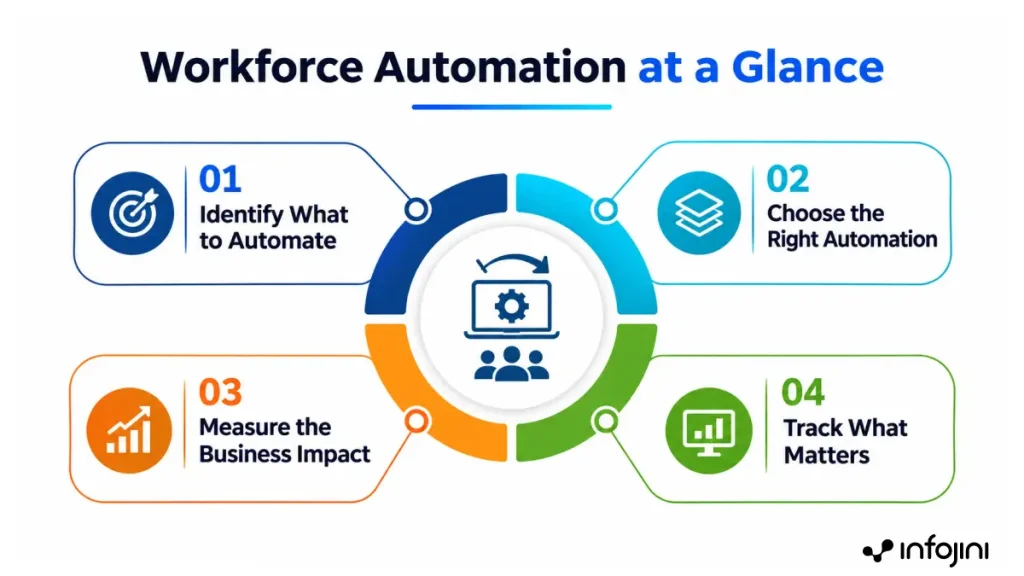
Successful automation of the workforce begins with identifying which processes must be automated, what techniques to use, and how to measure the results. This article will cover the different techniques of workforce automation, the advantages of each technique, examples of such applications, and how to analyze the return on investment.
Key Takeaways
- Workforce automation reduces manual effort and streamlines business processes.
- Types of workforce automation range from RPA to AI-driven and physical automation.
- Advantages of workforce automation include greater efficiency, accuracy, and scalability.
- Measuring ROI, strong governance, and human oversight are essential for success.
What Is Workforce Automation?
Workforce automation refers to utilizing technology along with AI for doing tasks that are repetitive or time-consuming in nature. With workforce automation, people can do more value-adding jobs. This involves automating individual tasks, processes across multiple departments, decision-making processes, and operations with little human intervention.
For example, one could automate data extraction from the invoice, automate the process of approval of invoices, alert for discrepancies, and update the accounting system.
Automation of the workforce generally involves four approaches:
- Task automation: Automates individual activities, such as data entry.
- Workflow automation: Connects multiple steps, such as onboarding and approval processes.
- Intelligent automation: Uses AI or machine learning to classify information, interpret documents, and support decisions.
- Workforce management automation: Streamlines scheduling, attendance tracking, demand forecasting, and labor allocation.
Why Workforce Automation is a Business Priority
There are several operational challenges that make automation obvious for businesses. Automation goes beyond replacing entire jobs. As stated by McKinsey Global Institute, approximately 50% of current work activities are technically automatable by using the latest technologies. This is why companies need to focus on evaluating each task and process automation possibilities instead of automatically replacing jobs.
- Increasing costs: The manual process consumes a lot of time and costs extra for the basic processes that can easily be automated. Through automation, the effort required per transaction can be reduced.
- Changing customer needs: Customers require faster service. Through automation, the time gap between process steps can be minimized.
- Insufficient manpower: As the workload increases, hiring more staff might not be an immediate option. Through automation, the extra workload can be managed by the current manpower.
- Accuracy and compliance: A well-implemented automation makes use of consistent rules and maintains an audit trail.
- Employees’ workload: Performing routine administrative tasks leaves employees with insufficient time for analysis and customer interaction. Automation enables employees to focus on important activities.
Types of Workforce Automation
Automation of the workforce takes different forms depending on the tasks involved, the complexity of the process, and the level of human involvement required. Some approaches automate repetitive tasks, while others coordinate entire workflows, support decisions, or handle physical tasks.
| Type | What it automates | Example | Primary business impact |
|---|---|---|---|
| Robotic process automation (RPA) | Rule-based digital tasks | Invoice data entry | Faster processing and fewer manual errors |
| Workflow automation | Multi-step business processes | Employee onboarding and approvals | Shorter cycle times |
| AI-powered automation | Tasks involving information interpretation | Support ticket classification | Faster information processing |
| Agentic automation | Goal-oriented, multi-step tasks | Coordinating service requests | Reduced manual coordination |
| Workforce management automation | Scheduling and labor planning | Shift allocation | Better resource utilization |
| Physical automation | Repetitive physical activities | Warehouse robotics | Greater throughput and consistency |
1. Robotic Process Automation (RPA)
RPA involves the use of software robots that execute digital activities based on predetermined logic. RPA is helpful in the transfer of data between systems, updating databases, and working with structured data.
For example, an RPA bot can get information from a structured file and import the same to the accounting system. In doing so, it eliminates repetitive data entry and ensures that employees concentrate on discrepancies.
2. Workflow Automation
Workflow automation links all the activities and people in the business process together. Unlike automation of a single task, it involves managing the flow of work from the moment it starts to its completion.
For example, an onboarding process can involve the coordination of activities like document collection, approval processes, and even IT access.
3. AI-driven Automation
AI-driven automation involves using AI to process data that might be challenging to analyze via pre-programmed rules alone. It can classify documents, understand customer needs, derive information from unstructured data, and suggest further actions.
According to a survey conducted by UiPath in 2026, only 31% of technology leaders in enterprises reported AI as being completely embedded within their organization. However, 89% of those companies whose AI was completely embedded in business orchestration met or even surpassed the expectations on ROI.
For instance, a customer service application can classify tickets and find relevant knowledge articles for the agent. Human intervention is still necessary when there is uncertainty about the information and when decisions have significant ramifications.
4. Agentic Automation
Agentic automation involves using AI agents to orchestrate several actions towards a certain goal. The agent will, within the boundaries of its permissions, acquire data, utilize the connected applications, perform certain actions, and escalate unresolved issues.
For example, an IT services agent can check a request for resetting passwords, make sure the necessary criteria are met, start the process, and inform the employee. Since such systems can choose actions depending on the changing data, permissions, auditing, and escalation are required.
5. Workforce Management Automation
Workforce management automation can assist businesses in planning schedules of employees, forecasting their needs, tracking attendance, and managing available resources.
Thus, a field service company can automate the process of scheduling through software that matches available technicians with customer requests in accordance with their skill set and location.
6. Physical Automation
Physical automation includes the use of robots and automated systems to carry out routine activities in warehouses, factories, and distribution centers.
So, warehouse robots can move materials from one place to another and automated equipment is used for packaging and repetitive assembling operations. However, such automation can be quite costly since it requires large investments in the acquisition and installation of equipment.
Key Benefits of Workforce Automation
The advantages of workforce automation go beyond just processes and extend to productivity, customer service, and even strategy.
I. Operational Benefits
Automation may lead to increased processing speed, reduced repetitive mistakes, and enhanced consistency. An example could be automatic invoice matching that helps finance departments identify mistakes faster and decrease manual correction efforts. Automated workflows also increase transparency and auditability.
It is important to understand that automation of an inefficient workflow would not make it more efficient. Therefore, before implementing automation, processes need to be optimized.
II. Workforce Benefits
Automation of routine tasks would give workers an opportunity to spend more time on analysis, cooperation, and solving complex problems. Moreover, automation decreases administrative workload for managers as well and increases utilization of available skills.
III. Customer Benefits
The use of automated ticket routing, notification regarding ticket status, and information lookup could assist in improving response time and consistency of handling customer requests. Employees would be able to concentrate on handling complex requests where empathy, investigation, and judgment are required.
IV. Strategic Benefits
Automation could aid businesses in managing variable workloads, increasing operational capacity, and improving workforce planning. It could also assist in uncovering any bottlenecks and areas where performance is lacking.
Combining these benefits, workforce automation can enable operational resilience rather than a mere cost-saving project.
Real-World Impact: Workforce Automation Use Cases
Below are examples of enterprise apps and possible impacts that automation can have on them.
1. Human Resources and Employee Onboarding
Problem: HR processes document coordination, approval, employee information, and IT provisioning.
Automation approach: Workflow links document completion, initiates approvals, requests system access, and alerts people about actions to be completed.
Potential effect: Quick onboarding and less administrative work helps in recruitment process automation.
2. Finance and Procurement
Problem: The invoice processing includes data input, match to purchase order, approval, and exceptions handling.
Automation approach: Document extraction gathers information from invoices, predefined rules validate the record, and workflows handle exceptions.
Potential effect: Faster processing and less avoidable corrections.
3. Customer Service
Problem: Support staff use valuable time to sort tickets, search knowledge bases, and send routine updates.
Automation approach: AI sorts the tickets and finds necessary data while workflows send them and escalate unsolved tickets.
Potential effect: Immediate response, better ticket sorting, and additional capability of agents to deal with complicated tasks.
4. Field Operations and IT Services
Problem: Field service employees need to synchronize employee presence, changes in loads and work assignments, whereas IT employees must deal with large numbers of simple tickets which can hold back their efforts to solve complicated problems.
Automation approach: Workforce management solutions automate scheduling, task assignment, absence management, and load balancing. IT workflows process approved requests for access, password resets, and incident triage.
Potential effect: Better utilization of resources, fewer conflicts in scheduling, faster processing of simple IT tickets, and freeing up specialists to work with complicated problems.
How to Build a Business Case for Workforce Automation
A strong business case explains what needs to improve, how the results will be measured, and whether the expected value justifies the investment.
Step 1: Identify Appropriate Processes
Look at high-volume, repetitive, time-intensive, and error-prone tasks with defined processes and measurable outputs. Consider processes where there is unnecessary transfer of work, duplication, follow-up, and process delay.
Step 2: Baseline Process Performance
Identify performance before implementing the change. Indicators could be manual hours per transaction, cost per transaction, cycle time, error rate, rework, backlog, and failure to meet SLA targets.
Step 3: Estimate the Benefits
Identify the changes that you expect to be seen in the processing time, error rate, volume, and service performance.
Distinguish between business savings and released employee capacity because of improvements. It becomes a financial gain if it leads to more work done, prevents additional hiring, eliminates overtime, or other quantifiable changes.
Step 4: Calculation of Total Cost
Include the costs of software subscriptions, software development, system integration, data preparation, employee training, change management, monitoring, and maintenance. AI-based solutions do require some usage cost and human review.
Step 5: Calculation of Return on Investment
Calculate the ROI using the following equation:
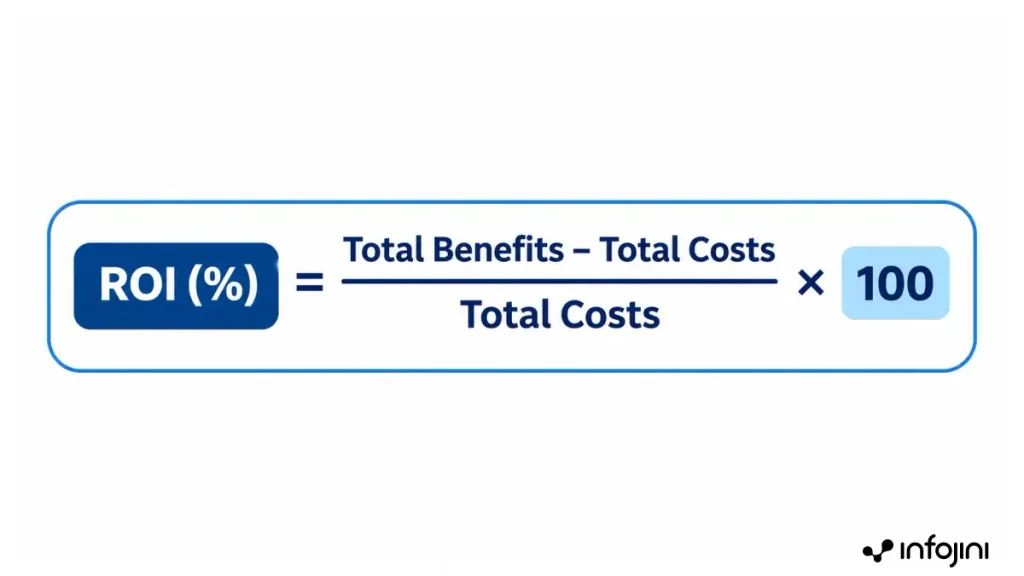
In case an initiative provides an annual benefit of $150,000 against total cost of $100,000, ROI would be 50% for that evaluation period.
Financial calculations must be realistic and should differentiate cash savings from economic value savings. Employee experience, compliance, and service quality have to be considered when they are important business goals.
Challenges of Workforce Automation and How to Overcome Them
Automation initiatives can underperform when organizations overlook process quality, employee concerns, or operational risk.
| Challenge | Practical response |
|---|---|
| Poorly standardized processes | Simplify workflows and establish consistent rules before automating. |
| Fragmented systems and data | Validate data quality and build reliable integrations. |
| Employee resistance | Communicate changes early and provide relevant training. |
| Unclear ownership | Assign process owners and define accountability across teams. |
| Complex exceptions | Establish escalation paths and retain human review. |
| AI errors | Validate outputs, monitor performance, and restrict sensitive actions. |
| Unclear business outcomes | Define baseline metrics and review benefits. |
Employee participation is especially vital. Discuss the responsibilities that might shift, where human know-how is indispensable, and how the employees will be helped through training and reassignment of responsibilities.
Best Practices for Successful Workforce Automation
Organizations can improve adoption and results by following these practices:
- Start with a defined business problem: Choose a process with measurable improvement potential.
- Fix the workflow first: Remove redundant steps and unnecessary approvals.
- Involve employees early: Use frontline feedback to identify exceptions and practical requirements.
- Design for human oversight: Review procedures for uncertain or high-risk decisions.
- Set clear governance: Define ownership, permissions, audit requirements, and accountability.
- Measure results consistently: Compare actual performance with the original baseline.
- Scale proven solutions: Reuse effective workflows, integrations, and controls where appropriate.
A successful pilot should demonstrate business value, not just technical feasibility, before the organization expands automation to additional processes.
Conclusion
Automation in the form of agents, intelligent orchestration, and predictive workforce planning will transform how tasks are orchestrated across systems within an organization. This will enhance the ability of organizations to react to changing workload levels. On the other hand, reliable data, good governance, accountability, and necessary human intervention are important elements that contribute to the success of workforce automation. An enterprise can be flexible and prepare its employees for future changes if it rethinks work automation from scratch.
To be successful in automation of the work process, enterprises need to choose the appropriate processes for automation, set realistic performance goals, involve employees, and evaluate business results, not just at the level of automation. Combining good technologies with good governance and evaluating the process regularly allows enterprises to save time on repeated processes, have consistent operations, and utilize the workforce in a better way.
Frequently Asked Questions
What are some major benefits of workforce automation?
Some major benefits of workforce automation include increased productivity, speed of process execution, reduced number of errors made manually, increased quality of services delivered, and optimal utilization of personnel capabilities.
What are some main categories of workforce automation?
Some main categories include robotic process automation (RPA), workflow automation, AI-driven automation, agentic automation, workforce management automation, and physical automation.
How does AI workforce automation differ from traditional automation?
Traditional automation uses predetermined rules to perform repetitive tasks, whereas AI workforce automation can understand unstructured data, categorize the request, and assist in decision-making. AI workforce can coordinate various activities within their designated authority limits.
How can enterprises determine the ROI of workforce automation?
Enterprises can determine their ROI by subtracting total automation expenses from the total value, dividing the output by total expenses, and multiplying by 100. Other measures that are used to evaluate overall impact include processing time, error rate, hours recovered, etc.