 Digital Transformation
 Data Engineering
 Implementation
 Staffing Services
Data teams working with Snowflake deal with more than storing and querying data. They also need to understand what is in their tables, check whether the data is reliable, document what different columns mean, maintain common business definitions, and identify changes or unusual patterns.
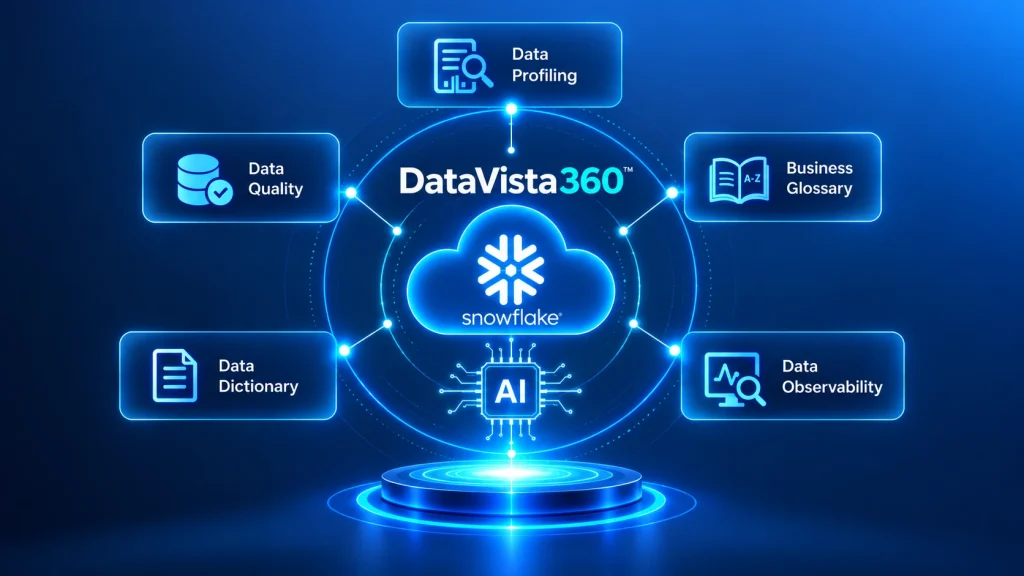
Managing these activities together can become difficult as data environments grow. Profiling data, running quality checks, maintaining documentation, defining business terms, and monitoring data health all require teams to keep different pieces of information aligned.
DataVista360 brings these tasks into one application.
Created by Infojini and using Snowflake Cortex AI, it helps in data profiling, data quality testing, creating business glossary, generating data dictionaries, and data observability right within Snowflake.
This tool brings together governance, observability, and documentation all in one package, specifically native to Snowflake. This solution is meant to assist teams in understanding their data, ensuring data quality, and maintaining the information surrounding the data.
Key Capabilities of DataVista360
Data profiling
DataVista360 can automatically analyze tables and provide column-level statistics.
The profiling includes information such as:
- Null rates
- Cardinality
- Data distributions
- Minimum and maximum values
These statistics give teams a starting point for understanding the data in a table.
It also uses Snowflake Cortex AI to summarize profiling results in plain language. This makes the information easier to review and helps users identify data patterns or potential issues without having to interpret every statistic themselves.
Data quality
DataVista360 also provides a way to check whether data meets rules defined by the team. Users can create quality rules such as NOT_NULL, UNIQUE, and COMPLETENESS and run assessments against their tables. The application calculates quality scores for each table and keeps the quality history over time.
Cortex AI is used here as well. When a quality check fails, it can explain the failure and recommend remediation steps. So, instead of only seeing that a table received a lower quality score, users can get additional information about what went wrong and what they may want to check next.
Business glossary
A business glossary gives teams a shared vocabulary for the data they work with. DataVista360 can generate glossary terms from Snowflake tables by interpreting column names and metadata. This can help connect technical information in Snowflake with the terminology used by the business.
There is another option for organizations that already have domain information stored in documents. It can extract domain-specific terms from PDFs and Word documents stored in a Snowflake stage. It uses embeddings and AI analysis to identify those terms and bring them into the glossary.
Data dictionary
DataVista360 can also generate column-level documentation. The application combines metadata from Snowflake INFORMATION_SCHEMA with descriptions generated through Cortex AI. The result is documentation that is easier for business users and technical teams to understand.
For example, instead of relying only on a column name or technical metadata, users can get a business-friendly description of what the column represents and how it can be used. This documentation is generated from the information already available in Snowflake, reducing the need to create every column description manually.
Data observability
DataVista360 includes data observability features for monitoring the health of data at the schema and table level.
Teams can monitor:
- Completeness
- Freshness
- Quality scores
The application also provides column analysis, pattern detection, and statistical anomaly detection. For anomaly detection, it uses methods including Z-Score and Isolation Forest.
When an unusual pattern is identified, Cortex AI can generate a root-cause explanation and suggest possible fixes. This gives users more information to work with when investigating an unexpected change instead of leaving them with an anomaly signal alone.
Why Build DataVista360 Natively for Snowflake
DataVista360 is built to run inside the customer’s Snowflake account. It uses Snowflake Cortex for AI analysis and reads metadata through INFORMATION_SCHEMA. The application also maintains its configuration, glossary terms, quality history, and embeddings in a stateful schema.
For organizations planning or expanding their Snowflake environment, DataVista360 can complement broader Snowflake consulting services, helping teams consider data governance, quality, and observability as part of their Snowflake setup.
There are no external dependencies or file-system persistence. This architecture keeps the application within the Snowflake environment where the data is already being managed.
Simple setup
Getting started with DataVista360 does not require a long configuration process. After installation, users can open it from Apps in Snowsight.
From there, they can:
- Configure the scope of analysis.
- Choose the Cortex AI model.
- Select the business domain.
- Optionally connect a document stage for glossary extraction.
- Run profiling, quality checks, glossary generation, documentation, and observability analysis from the relevant module tabs.
The different functions are available within the same application, so teams can work through different parts of data governance without moving between separate systems.
Security and access
DataVista360 uses a least-privilege access model. Customers decide which parts of their Snowflake environment the application can analyze. Access can be granted to the specific databases, schemas, and tables that need to be included.
The required access includes usage on selected databases and schemas, select access on tables, and the appropriate Cortex roles for AI capabilities.
Who is DataVista360 Meant For?
It is intended for several teams that work with data in Snowflake.
- Data engineering teams can use it for profiling, documentation, and data quality monitoring.
- Data governance teams can use it to create consistent business definitions and maintain documentation that can support governance requirements.
- Analytics teams can use quality scores and other data health information when working with datasets.
- Business stakeholders can benefit from the plain-language explanations of data assets and potential issues.
The application brings these different needs into the same Snowflake environment rather than treating profiling, quality, documentation, and observability as separate activities.
DataVista360 in Snowflake
DataVista360 brings several data governance and data management functions together inside Snowflake. It can profile tables, measure data quality, maintain a business glossary, generate column-level documentation, and monitor data. The Snowflake Cortex AI performs all these tasks in the processes of summary, explanation, recommendation, documentation, and anomaly detection.
For teams who are already using Snowflake, the application offers these functionalities within the very environment that they use for managing data and metadata.
Conclusion
DataVista360 brings together data profiling, data quality scoring, business glossary creation, data dictionary generation, and observability within one Snowflake application.
Using the power of Snowflake Cortex AI for performing AI-powered analysis and Snowflake for the underlying environment, it enables teams to perform all these functionalities in one place.
Frequently Asked Questions
What does DataVista360 do?
It helps organizations profile data, monitor data quality, detect anomalies, create business glossary terms, and generate column-level documentation directly inside Snowflake.
How does DataVista360 use Snowflake Cortex AI?
It uses Snowflake Cortex AI to summarize profiling results, explain quality failures, recommend remediation steps, generate documentation, and provide root-cause explanations for detected anomalies.
Does DataVista360 run inside Snowflake?
Yes. It runs inside the customer’s Snowflake account. It uses Snowflake Cortex for AI analysis and INFORMATION_SCHEMA for metadata and stores its configuration, glossary terms, quality history, and embeddings in a stateful schema.
Which teams can use DataVista360?
It is designed for data engineering, data governance, analytics, and business teams. Each team can use the capabilities relevant to its work, including profiling, quality monitoring, documentation, glossary creation, and data observability.