 Digital Transformation
 Data Engineering
 Implementation
 Staffing Services


Most companies are already storing their data in Snowflake. The difficulty is making it understandable. A column called ‘Amount’ or ‘LASTMODIFIEDDATE’ won’t mean anything to a sales manager, nor would an AI assistant know if the ‘Amount’ field should be aggregated or not.
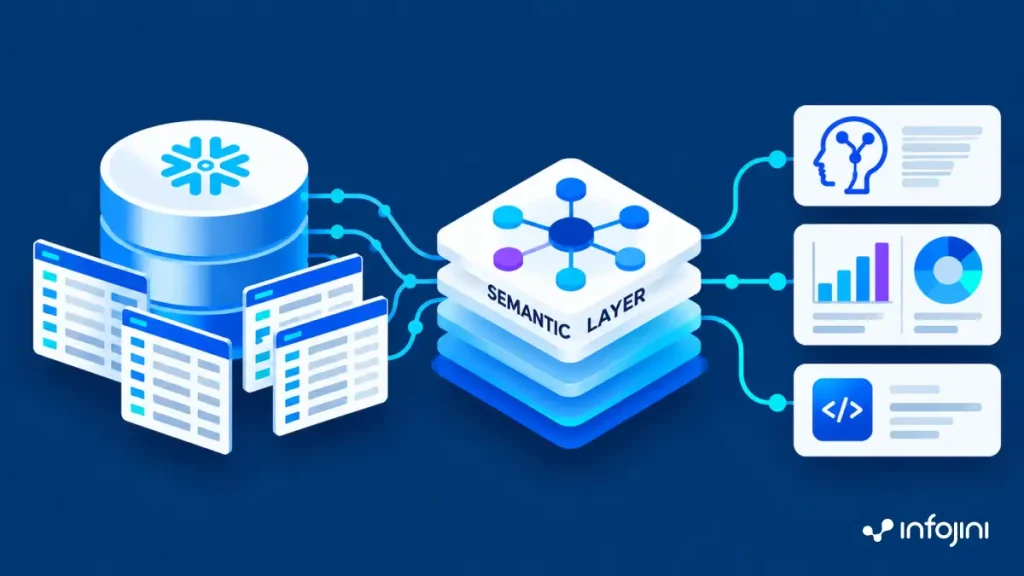
An AI tool such as Snowflake Cortex Analyst requires a semantic model like a YAML file where each column is described with its business meaning, synonyms, and aggregation rules. It will take weeks to write the semantic model for all tables manually, not to mention the freshness of the data once the schema changes.
What Semantic Agent Does
Semantic Agent solves this problem. It is a Snowflake Native App that analyzes your Snowflake tables and provides you with semantic model YAML in minutes through Snowflake Cortex AI.
For each table, the YAML labels:
- Dimensions: What you filter or group by (customer, region, status).
- Time dimensions: Dates for trend analysis (order date).
- Measures: Numbers for total or average (revenue, quantity).
- Descriptions, synonyms, and relationships: This is done between tables.
You can then add the YAML file to Cortex Analyst or plug it into your own AI agent.
How Semantic Agent Works, Inside Your Snowflake Account
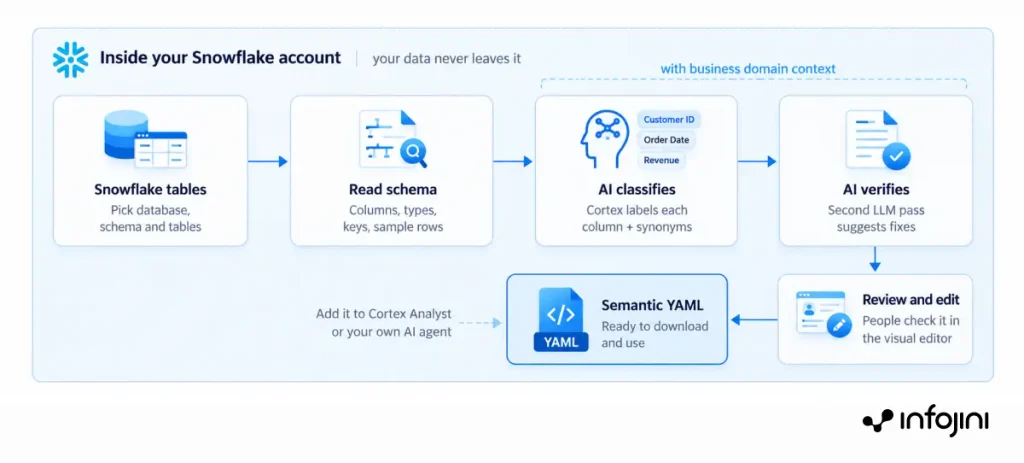
From Snowflake tables to a ready semantic model, all inside Snowflake.
The heavy lifting is done by AI. The process is then checked by another round of AI before finally being reviewed by a human.
Why a Snowflake Native App
Snowflake Native Application operates inside the Snowflake environment and enables organizations to utilize it without transferring any data or building additional infrastructure.
- Data stays in Snowflake. Nothing is copied to an outside server.
- No new AI vendor. It runs on Snowflake Cortex.
- Existing security applies. The app sees only what your Snowflake roles allow.
- Easy to install. No servers or extra setup.
Who it is for
This app is designed for teams responsible for building semantic models, maintaining consistent business definitions, and validating business terms and synonyms.
- Data and analytics engineers who build and maintain semantic models
- Data architects and governance teams who want consistent business definitions
- Domain experts who review the business terms and synonyms
Business Areas Covered
Pick a domain so the AI uses your industry’s language. Any other schema works with the generic setting.
| Domain | Sub-domains |
|---|---|
| Retail | E-commerce, Inventory, POS, CRM |
| Financialf | Banking, Insurance, Investments, Payments |
| Healthcare | Claims, Clinical, Pharmacy, Patient |
| Manufacturing | Supply Chain, Production, Quality, Logistics |
Business Value
- Faster AI readiness. Days of manual YAML writing become minutes.
- One version of the truth. Shared definitions for terms like “revenue” across teams.
- Lower cost and risk. No extra infrastructure, and data never leaves Snowflake.
- Easy to keep current. When tables change, regenerate and review.
How to Get Started
- Configure: Choose the database, schema, tables, and business domain.
- Generate: Click Generate.
- Refine: Review and adjust the model.
- Export: Download the YAML and add it to Cortex Analyst or your own AI agent.
Semantic Agent makes semantic models fast to build, consistent and secure, so your data is ready for AI sooner.
Conclusion
Semantic Agent employs Snowflake Cortex AI technology to convert Snowflake database tables into YAML semantic models ready for AI consumption within minutes. It automates model creation while keeping data inside Snowflake secure to assist companies in saving time, ensuring consistency in business definitions, and preparing data for Cortex Analyst and AI agents.